
Integrated Commercial Security Systems: What You Need to Know
Integrated commercial security systems bring together access control, video surveillance, intrusion detection, fire alarms, and other technologies into a single, unified platform — giving businesses one cohesive view of their entire security posture instead of a patchwork of disconnected tools. For facility managers, business owners, and institutional decision-makers in Oregon and Washington, understanding how these systems work and what to look for in a provider can mean the difference between a security investment that pays dividends for years and one that creates more problems than it solves. This guide covers everything you need to know about integrated commercial security systems: the core components, the benefits, the installation process, and how to choose the right solution for your operation.
Key Takeaways
- Integration means shared data, not shared address. Access control, video surveillance, intrusion detection and fire alarm operate on one platform rather than as four systems that happen to sit in the same building.
- The payoff is a single operating picture. One credential change, one alarm event, one audit trail across every subsystem.
- Deployment model matters. Cloud-managed platforms suit multi-site operations; on-premise still fits facilities with strict data-residency requirements.
- Most integration problems come from the old equipment, not the new. Undocumented legacy hardware and mismatched protocols cause more delays than anything being installed.
- Budget for total cost of ownership. Ongoing service, licensing and support typically outweigh the upfront hardware quote.
What Makes a Security System Truly Integrated?
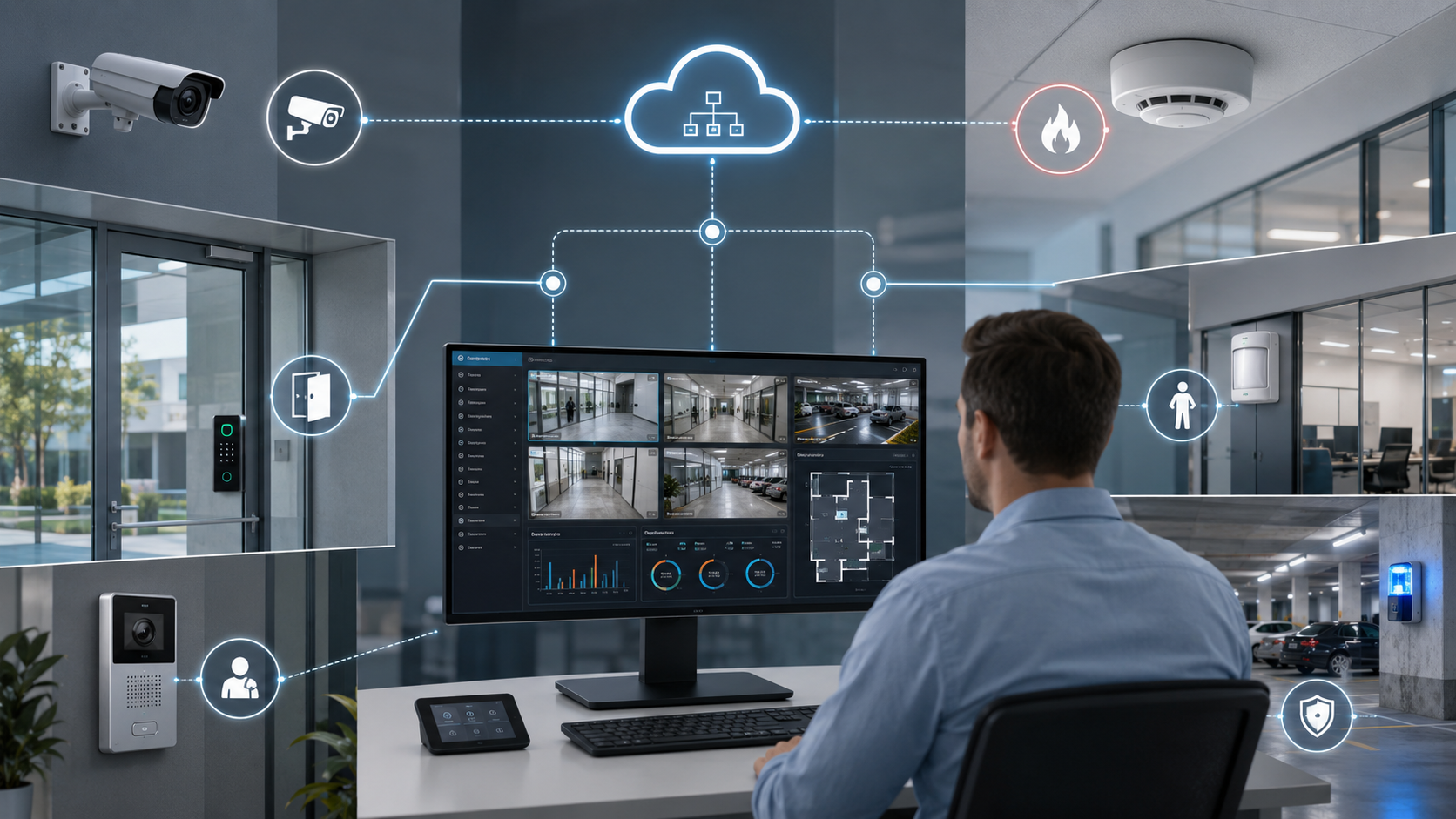
The word “integrated” gets thrown around a lot in the security industry, but not every system that claims to be integrated actually is. True integration means the different subsystems — cameras, door readers, alarm panels, fire detection, and more — can communicate with each other and share data in real time through a common platform or management interface.
A basic example: when an access control reader flags a tailgating event at a back door, an integrated system can automatically trigger the nearest camera to begin recording and send an alert to the facility manager’s phone simultaneously. In a siloed setup, those three things happen separately, if at all. In a genuinely integrated system, they happen automatically and in concert.
This kind of coordination is what separates a collection of security products from an actual security strategy.
Siloed Systems vs. Integrated Platforms
Many businesses start with individual security products — a camera here, a keypad there — and end up with a fragmented environment that’s difficult to manage and expensive to maintain. Staff must log into multiple interfaces, response times slow down because operators are context-switching between systems, and gaps in coverage go unnoticed because no single view shows everything at once.
An integrated platform eliminates that fragmentation. All data flows into one interface, all alerts are centralized, and response workflows can be automated. For organizations managing multiple locations — retail chains, school districts, healthcare networks, government facilities — this unified approach isn’t just convenient. It’s operationally essential.
Core Components of Integrated Commercial Security Systems
Every integrated commercial security system is built from a set of core technologies. The specific combination depends on the facility type, risk profile, and compliance requirements, but the following components appear in most commercial deployments.
- Access control: Electronic door readers, credential management, and door hardware that restricts and logs who enters which areas and when.
- Video surveillance: IP cameras, network video recorders (NVRs), and video management software (VMS) that capture, store, and analyze footage.
- Intrusion detection: Motion sensors, glass-break detectors, door and window contacts, and alarm panels that detect unauthorized entry.
- Fire alarm systems: Smoke detectors, heat sensors, manual pull stations, and notification devices tied to a fire alarm control panel.
- Intercoms and visitor management: Video intercom stations and door entry systems that control and log visitor access.
- Mass notification: Speakers, strobes, and software platforms that broadcast emergency communications across a facility.
- Weapons detection: Advanced screening systems for high-risk environments like schools, courthouses, and healthcare facilities.
- Cloud management: Software platforms that allow remote monitoring, configuration, and reporting from any internet-connected device.
When these components are integrated, each one becomes more powerful than it would be on its own. The whole system genuinely becomes greater than the sum of its parts.
According to the Federal Bureau of Investigation, a violent crime occurred, on average, every 25.9 seconds in the United States in 2024. For commercial facilities, having systems that detect threats and coordinate responses automatically — rather than relying on manual monitoring alone — is no longer optional. It’s a baseline expectation.
Industries That Benefit Most From Integrated Security
Integrated commercial security systems are relevant across virtually every industry, but certain sectors have particularly compelling use cases where the interconnected nature of these platforms delivers outsized value.
Education
Schools and universities face a unique security challenge: they need to be open, welcoming environments for students and staff while maintaining strict controls on who can access specific areas. Integrated systems allow campuses to manage visitor check-in, lockdown protocols, fire alarm coordination, and video review from a single interface. When a lockdown is triggered, integrated systems can automatically lock all card-access doors, activate camera recording, and push alerts to administrators and law enforcement simultaneously. For more on how schools specifically approach life-safety technology, the guide on mass notification systems and school safety covers the notification layer in depth.
Healthcare
Hospitals and clinics must protect patients, staff, controlled substances, and sensitive records — often across buildings with complex floor plans and around-the-clock operations. Integrated systems help healthcare facilities enforce infant security protocols, manage access to pharmacy and server rooms, monitor parking structures, and maintain audit trails for regulatory compliance.
Government and Municipal Facilities
Government buildings typically have stringent security standards and must demonstrate compliance with federal and state requirements. Integrated platforms help these facilities maintain detailed access logs, coordinate with law enforcement systems, and manage multiple entry points with consistent credential policies.
Retail
Retailers deal with loss prevention, employee safety, and operational accountability. Integrated systems tie point-of-sale data to camera footage, automate perimeter alerts after hours, and give multi-location operators a single dashboard for all their properties. For retailers exploring their options, the overview of commercial alarm system costs and installation is a helpful starting point for budgeting the security investment.
Multitenant and Commercial Real Estate
Property managers overseeing office buildings, mixed-use developments, or apartment complexes need systems that can segment access by tenant while giving the property management team visibility across the whole building. Cloud-based integrated platforms make it easy to provision or revoke credentials remotely, generate reports for tenants, and manage multiple properties from one account.
How Integration Actually Works: Technology and Architecture
Understanding the underlying architecture of integrated systems helps you ask the right questions when evaluating providers and proposals.
Most modern integrated commercial security platforms use an IP-based architecture, where cameras, access control panels, alarm systems, and other devices all connect to the facility’s network and communicate using standardized protocols. A central software platform — sometimes called a physical security information management (PSIM) system or a unified security management platform — acts as the hub, ingesting data from all connected devices and presenting it through a single interface.
Cloud-connected systems extend this architecture further, storing video and event data offsite, enabling remote management through web browsers and mobile apps, and allowing the provider to push software updates and patches without requiring a site visit. This cloud layer is particularly valuable for organizations with multiple locations, since administrators can monitor all sites from one account regardless of where they are physically located.
Open-architecture platforms, which support hardware from multiple manufacturers through standard APIs and integrations, give facilities more flexibility than proprietary systems that lock you into a single vendor’s hardware ecosystem. When evaluating providers, asking whether their platform is open or proprietary is one of the most important questions you can ask.
 Integrated Commercial Security Systems: Comparing Deployment Models
Not every integrated system is deployed the same way. The table below compares the most common deployment models to help you understand the trade-offs.
| Deployment Model | How It Works | Best For | Key Considerations |
|---|---|---|---|
| On-premise / local server | All data stored and processed on servers located at the facility | Single-site facilities with strict data sovereignty requirements | Higher upfront hardware cost; requires local IT support; upgrades can be disruptive |
| Cloud-hosted | Data and management software hosted in secure offsite data centers | Multi-site organizations; facilities with limited IT staff | Ongoing subscription cost; requires reliable internet; easier remote management |
| Hybrid | Critical data stored locally; management and remote access via cloud | Facilities that need local resilience with cloud convenience | More complex to configure; balances cost, control, and accessibility |
| Managed security service | Third-party provider monitors and manages the system on your behalf | Organizations without dedicated security staff | Ongoing service fee; response depends on provider SLA; reduces internal burden |
The Installation Process: What to Expect
Installing an integrated commercial security system is a multi-phase process that looks different from dropping a retail camera kit on a shelf. Here’s how a professional installation typically unfolds.
Note that requirements for fire alarm systems, access control, and other life-safety components vary by jurisdiction across Oregon, Washington, and individual municipalities. Before installation begins, confirm applicable code requirements with your local building department or authority having jurisdiction (AHJ).
- Site assessment and risk analysis: A certified technician walks the facility to identify entry points, blind spots, high-value assets, and existing infrastructure. This informs the system design.
- System design and proposal: The provider develops a detailed design specifying equipment, cable routing, server or cloud architecture, and integration points. A professional design phase prevents costly changes during installation.
- Low voltage wiring: Most commercial security components — cameras, card readers, alarm sensors, intercoms — run on low voltage cabling. This work requires proper planning and certified installation to ensure reliability and code compliance.
- Equipment installation: Cameras, door hardware, alarm panels, intercom stations, and other devices are mounted, wired, and configured according to the design.
- System integration and programming: Individual subsystems are connected to the central platform, automation rules are configured, and the system is tested to verify that all integrations work as designed.
- Training and handover: Facility staff receive training on the management interface, alarm response procedures, and how to generate reports or pull footage.
- Ongoing support: A reputable provider offers monitoring, maintenance, and technical support after installation to keep the system performing at its best.
Key Questions to Ask When Choosing a Provider
The provider you choose matters as much as the technology itself. An integrated system is only as good as the design behind it and the support that follows installation. Here are the questions that separate excellent providers from average ones.
- Are your technicians certified, and what certifications do they hold? Look for certifications relevant to the specific technologies being installed.
- Do you offer open-architecture systems or proprietary hardware only? Open platforms give you flexibility to upgrade individual components without replacing the entire system.
- What does your post-installation support look like? Ask specifically about response time guarantees, remote support availability, and preventive maintenance programs.
- Can you provide references from facilities similar to mine? A provider with experience in your industry will understand the specific regulatory and operational context you’re working in.
- How do you handle system updates and cybersecurity? Because integrated systems connect to IP networks, they’re exposed to cyber threats. Providers should have a clear policy for patching and securing connected devices.
- Do you handle the full scope — design, installation, and support — or do you subcontract portions? Full-service providers who own the entire process are generally more accountable for outcomes.
Cyber incidents are rising at a rate of 21% worldwide annually, according to the World Bank. Integrated security systems that connect to your network are part of your cybersecurity surface area — not separate from it. Any provider who doesn’t address network security as part of their proposal isn’t giving you a complete picture.
Common Integration Challenges and How to Avoid Them
Integration projects don’t always go smoothly, especially when they involve legacy equipment or multiple vendors. Being aware of the common failure points helps you plan around them.
Compatibility issues are the most frequent problem. If your facility has existing security hardware from multiple manufacturers that were purchased at different times, not all of it will integrate cleanly with a new central platform. A thorough site assessment should inventory existing equipment and flag compatibility concerns before design begins — not during installation.
Network infrastructure limitations are another common issue. IP cameras and access control panels require adequate bandwidth and reliable network connectivity. Facilities with aging network infrastructure may need to upgrade their switches, cabling, or wireless access points before an integrated security system can perform reliably.
Scope creep during installation can push timelines and budgets beyond initial projections. The best protection against scope creep is a detailed design document that specifies exactly what is included — and what is not — before any work begins.
Finally, inadequate training leads to underutilization of expensive systems. If staff don’t know how to use the management interface effectively, many of the integration benefits you paid for will go untapped. Require a formal training plan as part of the installation contract.
Integrated Commercial Security Systems: Total Cost of Ownership
Budgeting for an integrated system requires thinking beyond the initial equipment and installation cost. A realistic total cost of ownership calculation includes several categories.
- Hardware: Cameras, access control readers, alarm panels, servers or cloud storage subscriptions, intercoms, and cabling.
- Installation labor: Design, low voltage wiring, mounting, programming, and integration work by certified technicians.
- Licensing: Many video management and access control platforms charge per-camera or per-door licensing fees, either as a one-time purchase or an annual subscription.
- Monitoring: If you want professional central station monitoring for intrusion, fire, or video, that typically involves a monthly or annual service fee.
- Maintenance and support: Preventive maintenance visits, firmware updates, and technical support contracts protect the long-term reliability of the investment.
- Expansion: A well-designed integrated system should be scalable. Factor in the cost of adding cameras, doors, or new sites as your organization grows.
Getting competitive bids from multiple providers is reasonable, but be cautious of proposals that significantly undercut others — they often reflect cut corners on design quality, equipment tier, or post-installation support. The lowest-cost integrated system proposal frequently becomes the highest total cost of ownership.
Frequently Asked Questions
What is the difference between an integrated security system and a standard commercial alarm system?
A standard commercial alarm system typically handles a single function — intrusion detection or fire alarm — and operates independently. An integrated commercial security system connects multiple subsystems (access control, video, intrusion, fire, and more) into one unified platform where they share data and can trigger automated responses across components. The integration layer is what makes the system significantly more capable than the sum of its individual parts.
How long does it take to install an integrated commercial security system?
Installation timelines vary significantly based on facility size, the number of components, and whether any existing infrastructure can be reused. A small commercial office might take a few days. A multi-building campus or a healthcare facility with complex access control requirements could take several weeks. Your provider should give you a detailed project schedule as part of the proposal, including milestones for design approval, wiring, equipment installation, and commissioning.
Can I integrate new security technology with my existing equipment?
Often, yes — but it depends on what you have and what you’re adding. Many modern integrated platforms support legacy equipment through standard protocols or third-party integration modules. The key is a thorough compatibility assessment before design begins. In some cases, older equipment may need to be replaced to achieve full integration, but a good provider will identify those gaps early and give you options.
Are integrated commercial security systems difficult to manage day-to-day?
They don’t have to be. Well-designed integrated systems actually simplify day-to-day management by consolidating everything into one interface. The key is choosing a provider who prioritizes usability in the system design and provides thorough training during handover. Cloud-based platforms in particular are designed to be accessible to non-technical staff through intuitive web and mobile interfaces.
Do integrated security systems require ongoing maintenance?
Yes. Like any technology infrastructure, integrated security systems require regular maintenance to stay reliable and secure. This includes firmware and software updates to address vulnerabilities, periodic inspection of cameras and sensors to verify they’re functioning correctly, and testing of fire and intrusion alarm components according to applicable code schedules. Most professional providers offer maintenance contracts that cover these activities, which is almost always more cost-effective than reactive repairs after a failure.
When it comes to integrated commercial security systems, the most important takeaway is this: the technology is only as effective as the strategy behind it and the expertise of the people who design, install, and support it. A system that connects access control, video surveillance, fire detection, intrusion alarms, and cloud management into a single cohesive platform gives your facility a security posture that no individual product can match — but achieving that outcome requires a provider with deep technical knowledge, a full-service approach, and a genuine understanding of your industry’s specific risks and requirements. For businesses in Oregon and Washington, working with a local provider who knows the regulatory environment and can respond quickly when issues arise makes the difference between a security investment that protects your people and property for years, and one that creates ongoing frustration.
Can one provider handle every part of an integrated system, or do we need multiple vendors?
One provider can handle the whole stack, and there are real advantages to it. When the same team designs the access control, cameras, intrusion detection and fire alarm layers, integration is planned from the start instead of retrofitted between vendors who never spoke to each other. It also means one point of accountability when something needs service, rather than three companies pointing at each other.
Does an integrated system still require separate fire alarm inspection and testing?
Yes. Integrating a fire alarm system into a wider security platform does not change your code obligations. Fire alarm systems remain subject to their own periodic inspection and testing requirements regardless of what else they are connected to, and those records are typically what an inspector asks for first. Build that recurring schedule into your service agreement rather than treating it as an afterthought.